Groovy Christmas: A Font That Delivers Festive Charm
Finding the right typeface for a holiday project often feels like a compromise. You either get a generic sans serif that lacks personality or a complex script that kills readability. Groovy Christmas solves this by bridging the gap between nostalgic 70s aesthetics and modern holiday whimsy. It is not just a font; it is a set of design assets that serve a specific, playful purpose. If you are working on branding for a seasonal pop-up shop, creating merchandise, or designing social media graphics, understanding how to leverage this premium font can elevate your final product from standard to memorable.
Visual Style and Character Details
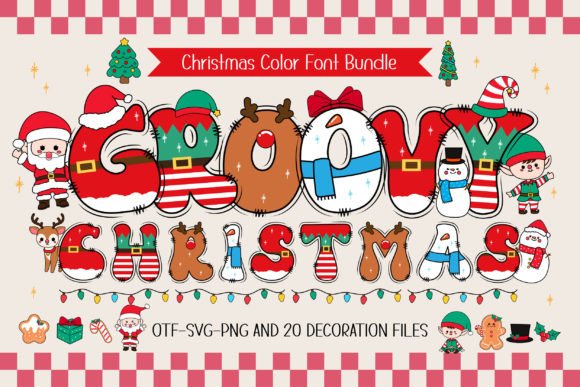
The defining feature of Groovy Christmas is its integration of illustrative elements directly into the letterforms. Unlike a standard display font, where the shape of the letter is the only feature, this typeface incorporates details like Santa hats, reindeer antlers, and snowman silhouettes into the strokes. This creates a "decorated" look that requires less external artwork to fill a space.
From a technical perspective, the font offers two distinct file types. The black version is a standard vector outline. This is crucial for production work, particularly for crafters using Cricut Design Space or other cutting machines. The color version, however, is designed for digital environments. It relies on the OTF or TTF format to render specific colors and textures within the letter itself.
The visual weight of the font is heavy. It is best categorized as a block or bubble style with a retro flair. Because of the intricate details, it functions strictly as a display font. Using it for body copy would result in a cluttered page, but for headers and logos, the "groovy" aesthetic provides a strong, nostalgic anchor. It sits comfortably alongside modern typography trends that favor bold, expressive lettering over minimalism.
Practical Applications for Creators and Businesses
The utility of Groovy Christmas extends across various mediums, but it requires the right context. For small business owners, this font works exceptionally well for packaging design, specifically for holiday limited editions. A bakery or coffee roaster could use this typeface for a seasonal blend label to immediately communicate a fun, approachable brand identity.
For those in the apparel market, the compatibility with cutting machines is a significant advantage. You can use the black version to cut vinyl or heat transfer material for T-shirts and tote bags. The included 20 bonus clip arts allow you to create matching graphics without needing to source additional design assets. This ensures visual consistency between the text and the imagery, a core component of effective brand identity.
In the realm of digital design, the color version of the font shines. It is optimized for software like Adobe Photoshop and Illustrator. Content creators can use it for YouTube thumbnails, Instagram Stories, or blog headers where the "retro holiday" vibe is the main draw. However, it is important to note the technical limitations: the color version is not compatible with Cricut. If you are a digital designer handing off files to a production team, ensure they have the correct software or the black version for physical output.
Design Strategy: Pairing and Readability
When integrating Groovy Christmas into a layout, restraint is key. Because the font is highly stylized, pairing it with a neutral typeface is essential for hierarchy. A clean sans serif font or a simple serif font works best for supporting text. If you pair it with another script font or a busy handwritten font, the design will become chaotic and difficult to read.
Consider the visual hierarchy of your project. Use Groovy Christmas for the primary headline or the logo mark. Use a sans serif like Helvetica or Arial for the details, such as dates, locations, or product descriptions. This contrast allows the decorative font to grab attention while the supporting text conveys the necessary information clearly.
Letter spacing (tracking) is another factor to monitor. Because the letters in this font feature protruding details—like a reindeer ear on an 'E' or a Santa hat on an 'S'—they often need slightly more space than a standard block font. Tightening the kerning too much can cause these decorative elements to overlap, turning the word into an unreadable jumble. In editorial design, such as a holiday magazine cover, giving the text room to breathe ensures the details remain distinct.
Evaluating Project Fit and Commercial Use
Before committing to Groovy Christmas, evaluate the tone of your project. This is a creative font that leans into nostalgia and playfulness. It is perfect for a toy store, a family-oriented event, or a casual holiday party invitation. It is likely less suitable for a luxury jewelry brand or a high-end corporate gala, where the tone requires something more understated and elegant.
From a workflow perspective, always test the font in your specific design environment before purchasing or starting production. Download the Ultimate Font Guide provided by the creator to understand the nuances of the color layers. In programs like Silhouette Studio or Inkscape, you may need to flatten layers differently than in Photoshop.
Finally, consider the longevity of the asset. While it is seasonal, a premium font with this level of detail can be used year after year. By creating templates now—such as a reusable web design banner or a standard T-shirt layout—you can streamline your production process for future holiday seasons. The goal is to use Groovy Christmas not just as a decoration, but as a functional tool to build a cohesive, festive brand experience.